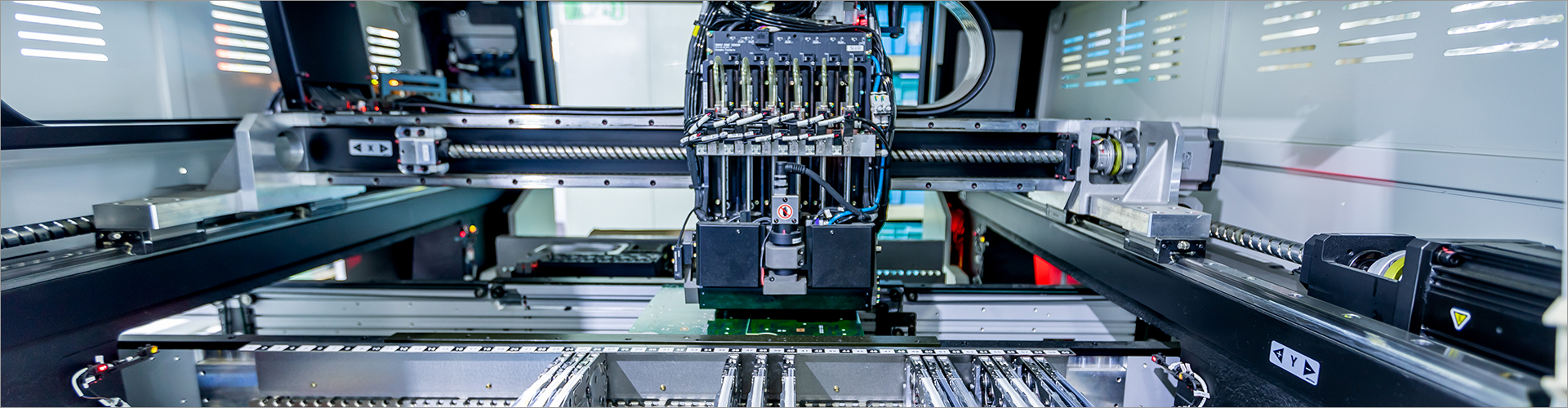

Digital factory management software connects production planning, shop-floor execution, quality, maintenance, inventory, and operational reporting in one controlled environment. I recommend selecting it by starting with your most urgent production problem, then checking integration capability, workflow fit, data visibility, implementation effort, and supplier support. The best solution is not necessarily the one with the largest feature list; it is the one your operators, supervisors, engineers, and managers can use consistently. This guide explains the core concepts, application fit, evaluation framework, purchasing considerations, and supplier checklist needed to make a practical decision.
If you are looking for more details, kindly visit our website.
This guide is designed for manufacturers evaluating software for a new digital factory project or replacing disconnected spreadsheets and legacy systems. It is relevant to production managers, plant directors, operations engineers, IT teams, procurement departments, and machinery companies that need better control of manufacturing data. It can also help exporters and multi-site manufacturers compare suppliers before requesting a formal proposal.
I particularly recommend using this guide when your business is experiencing delayed production updates, unclear work-in-progress status, repeated data entry, inconsistent quality records, or limited visibility into equipment performance. These symptoms do not automatically mean that a large platform is required, but they do indicate that your current management process should be assessed systematically.
Digital factory management software is a production-management platform that collects and organizes operational information from people, machines, materials, and business systems. Depending on the product architecture, it may include manufacturing execution functions, production planning, warehouse coordination, quality management, equipment maintenance, traceability, dashboards, and workflow approvals. It is usually positioned between enterprise-level business software and the real-time activities taking place on the factory floor.
The software does not replace every system in a manufacturing business. Instead, it should provide a reliable operational layer and exchange data with systems such as ERP, PLC, SCADA, warehouse platforms, laboratory systems, or customer portals where appropriate. During evaluation, I advise buyers to define which system will own each important data item, such as production orders, inventory balances, quality results, and maintenance records.
Manufacturers generally compare cloud-based, on-premises, and hybrid deployment models. Cloud software can reduce the need for local infrastructure and may simplify access across locations, while on-premises deployment can provide greater control over local data policies and network dependencies. A hybrid model may be suitable when selected production data must remain on-site while management reporting is shared across facilities.
Feature scope is another important distinction. Some platforms focus on production execution, while others combine planning, quality, maintenance, warehouse, and equipment connectivity in a broader digital factory solution. I recommend avoiding vague claims such as “fully integrated” until the supplier demonstrates the actual data flow, interface method, user permissions, and failure-handling process.
| Evaluation area | Questions to ask | Evidence to request |
|---|---|---|
| Usability | Can operators complete common tasks quickly? | Role-based demonstration and trial workflow |
| Integration | Can the platform exchange data with existing systems? | Interface documentation and sample data mapping |
| Scalability | Can more lines, users, and sites be added later? | Architecture explanation and expansion process |
| Traceability | Can materials, operations, inspections, and products be linked? | End-to-end traceability demonstration |
| Security and control | Can access and approvals be managed by role? | Permission model, audit-log description, and backup policy |
A discrete manufacturing plant may prioritize bill-of-material control, routing, assembly confirmation, serial-number tracking, and machine status. Process manufacturers may need batch management, formula control, process parameters, sampling, and stronger genealogy requirements. Job shops often need flexible scheduling and rapid order changes, while high-volume factories may focus on line balancing, cycle-time monitoring, and exception management.
For machinery manufacturers, the software should support engineering changes, component traceability, work instructions, inspection records, and service-related information. For factories operating several production lines, I suggest testing how the platform handles shared resources, different shift calendars, multiple plants, and varied approval rules. Application fit should be verified through your own sample order rather than a generic presentation.
Begin with a documented problem statement, such as “production status is updated once per shift” or “quality records cannot be linked to a finished serial number.” Record the current process, responsible roles, required data, and business impact. A focused problem statement prevents the project from becoming an unfocused search for every possible software feature.
Separate requirements into must-have, important, and optional categories. Must-have items may include production order control, user permissions, quality workflows, integration, or traceability, depending on your operation. I recommend limiting the must-have list to capabilities that are necessary for the first implementation phase and assigning acceptance criteria that can be demonstrated.
Ask each supplier to demonstrate a complete scenario from order release to production confirmation, inspection, material usage, exception handling, and reporting. Include at least one abnormal case, such as a rejected inspection, material shortage, rework operation, or equipment stoppage. A system that performs well only in an ideal workflow may create avoidable workarounds after deployment.
If you want to learn more, please visit our website Yinglai Technology.
List the systems that must exchange data and identify the direction and frequency of each exchange. Some information may need near-real-time updates, while other data can be synchronized at scheduled intervals. For example, a production dashboard may refresh every 5 minutes, whereas a management report may be updated once per day; the suitable interval depends on the decision being supported.
Purchase evaluation should include licensing, configuration, integration, hardware or terminals, training, data migration, support, upgrades, and future expansion. Ask whether pricing is based on users, sites, machines, modules, transactions, or production volume. Request a written scope so that a low initial quotation does not hide necessary services or later customization costs.
Software normally does not have a physical minimum order quantity in the same way as machinery or components. However, suppliers may define minimum subscription terms, minimum project scope, minimum user counts, or minimum implementation fees. Because pricing models vary, I recommend requesting a cost breakdown for the pilot phase, production rollout, integrations, training, annual support, and optional modules.
Implementation lead time depends on the number of sites, workflows, interfaces, historical data requirements, and customer availability for testing. A small pilot may be planned in weeks, while a multi-site transformation can require a longer staged program; buyers should treat any fixed timeline as provisional until the scope is confirmed. The supplier should also explain milestones, responsibilities, acceptance criteria, data preparation, and post-launch support.
When evaluating a digital factory management software supplier, I recommend checking capability in five areas: product, implementation, support, commercial terms, and long-term adaptability. The supplier should explain what is standard, what requires configuration, and what requires custom development. This distinction is essential because customization can affect budget, upgrade paths, testing, and future maintenance.
One common mistake is selecting software from a feature checklist without testing daily operator tasks. Another is assuming that data integration will be simple without reviewing machine protocols, legacy databases, network conditions, and master-data quality. Buyers should also avoid defining success only as software installation; meaningful success requires adoption, reliable data capture, and useful decisions based on that data.
It is also risky to digitize an inefficient process without first deciding which steps should be standardized. Excessive customization can make the system difficult to maintain, while insufficient training can cause users to return to spreadsheets or informal messaging. I recommend starting with a controlled pilot, measuring usage and data quality, then expanding after the workflow has been verified.
As a machinery and digital factory solution supplier, Yinglai Technology can support buyers by discussing production workflows, equipment coordination, factory information requirements, and software implementation priorities. Our role should begin with understanding the factory rather than immediately proposing a fixed package. We can help organize the requirement scope, identify suitable modules, and clarify which parts may require integration or customization.
For an effective inquiry, prepare your factory type, number of production lines, user roles, existing systems, key machines, required reports, and most urgent management problems. You can also provide a sample production order and a simple process map for supplier review. This information allows Yinglai Technology to respond with a more relevant solution direction, implementation discussion, and commercial scope.
The right digital factory management software is the platform that fits your production model, connects the information you actually use, and can be adopted by the people responsible for daily operations. Start by documenting one or two high-value problems, define the required workflow, and invite suppliers to demonstrate that process with your terminology. Then compare technical fit, implementation risk, total cost, support capability, and expansion options.
Your next step should be to prepare a concise requirements brief and request a structured consultation from qualified suppliers. Yinglai Technology can discuss your machinery environment and digital factory objectives, review the initial scope, and help identify a practical path from production data collection to more coordinated factory management.
Want more information on Digital Factory Management Software? Feel free to contact us.
32
0
0
All Comments (0)
If you are interested in sending in a Guest Blogger Submission,welcome to write for us!


Comments